Apple Pay reached 60.2 million U.S. users in 2024 and handled $268 billion in physical-store purchases, while Google Pay processed 6.92 billion UPI transactions in India in a single month at a 35.56% market share. Those figures show why the right wallet depends on your region, device, card, and payment use case.
You've probably seen the simplified version of the comparison: Apple Pay for iPhone users, Google Pay for Android users, and Samsung Pay for Galaxy owners. That advice is directionally useful, but it misses the failure point that matters most to crypto-card users. You can hold a Visa or Mastercard, use a compatible phone, stand in front of an NFC terminal, and still have your payment rejected.
The reason is that wallet availability, merchant acceptance, and card compatibility are separate things. Your issuer must approve the product for provisioning, the network must support token creation, and the wallet must accept your device and region. A crypto card that works for online purchases may still fail when you try to add it to a mobile wallet.
Table of Contents
- Why Your Crypto Card Choice Matters More Than the Wallet
- Apple Pay Google Pay and Samsung Pay Explained
- Feature Comparison Across the Three Wallets
- How to Check If Your Crypto Card Works in Each Wallet
- Regional Availability and Merchant Acceptance
- Which Wallet Should You Choose for Your Crypto Card
Why Your Crypto Card Choice Matters More Than the Wallet
You receive a crypto-linked debit card, activate it, and load it into your phone. At the coffee shop, you authenticate with your fingerprint or Face ID, tap the terminal, and get a decline. The terminal accepts contactless payments. Your phone works. The failure sits somewhere between the issuer, the card network, and the wallet.
That distinction matters because Apple Pay, Google Pay, and Samsung Pay don't just digitize the plastic card. Each wallet requests a payment token, ties that token to a device or account, and sends additional transaction data for authorization. If the issuer hasn't enabled token creation for your exact card product, country, or device, the provisioning attempt can fail before you ever reach the checkout terminal.
Practical rule: A wallet logo on a card issuer's website isn't proof that every card variant from that issuer can be added.
The product type creates another layer of risk. Physical debit cards, virtual cards, prepaid cards, secured cards, and cards linked to crypto balances may sit on the same payment network while receiving different wallet permissions. A virtual card can work for manual online checkout but remain unavailable for in-store tokenization. A physical card can activate normally and still be blocked from recurring payments, transit, ATM use, or cross-border transactions through the wallet.
| What must work | What to verify |
|---|---|
| Device eligibility | Whether your phone or watch is supported in your country |
| Issuer approval | Whether the exact crypto-card product can be provisioned |
| Network tokenization | Whether the issuer can create and manage a wallet token |
| Merchant acceptance | Whether the terminal accepts the relevant contactless method |
| Transaction category | Whether in-store, online, recurring, transit, or ATM use is allowed |
The most reliable approach is to treat card compatibility as the first decision, device ownership as the second, and regional usage as the third. The wallet itself is only one component in that chain.
Apple Pay Google Pay and Samsung Pay Explained
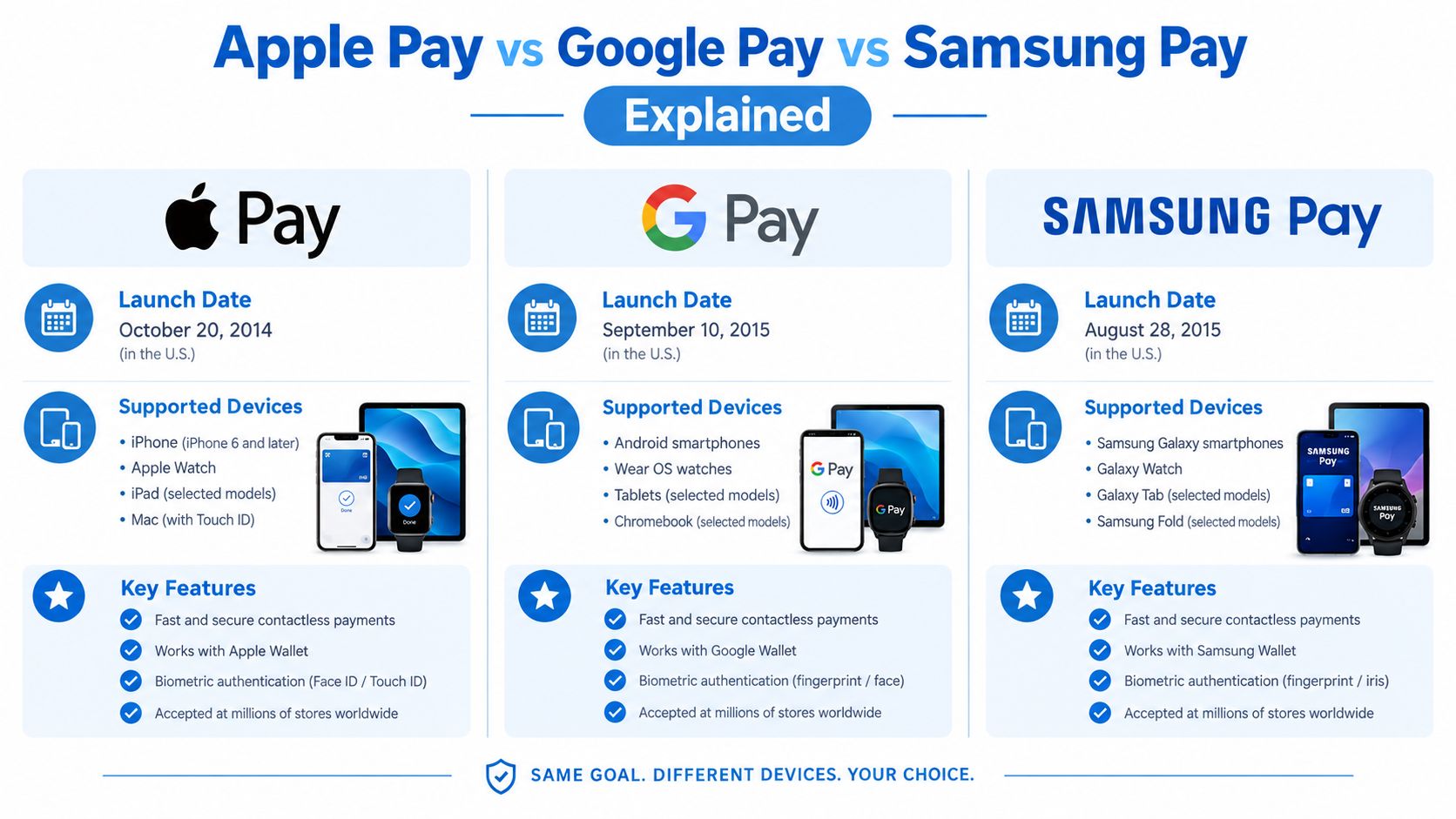
Apple Pay, Google Pay, and Samsung Pay emerged as three major mobile-payment approaches during the 2010s, but they developed around different hardware and ecosystem decisions. Apple Pay launched in the United States in October 2014, using near-field communication, or NFC, and tokenization. Google introduced Android Pay in 2015, later bringing Android Pay and Google Wallet together under the Google Pay brand before Google Wallet became the primary consumer wallet name in many markets during 2022 and 2023. Samsung Pay also launched in 2015.
Apple Pay is tightly connected to Apple hardware. It stores a Device Account Number in the device's Secure Element and requires Face ID, Touch ID, or a passcode for payment authorization. That design gives Apple control over the device environment, but it also means your issuer must approve the Apple-specific provisioning process.
Google's wallet experience is more distributed across the Android ecosystem. Google Pay uses tokenized virtual account numbers and device authentication. In the United States, Google's consumer product transitioned from Google Pay to Google Wallet in June 2024, so users may still say “Google Pay” while looking for Google Wallet on their phones.
Samsung Pay initially stood apart through support for both NFC and magnetic secure transmission, or MST. That allowed some Samsung devices to work with older magnetic-stripe terminals as well as newer contactless readers. Samsung has since folded Pay into Samsung Wallet, and older MST explanations can now mislead users evaluating current Galaxy devices.
Tokenization is the shared foundation
All three wallets use network tokenization instead of exposing the underlying payment-card number to the merchant. During a contactless payment, the wallet presents a device- or account-specific token with a transaction cryptogram. The merchant receives payment credentials that aren't the original card number.
That common security model doesn't make the wallets interchangeable for issuers. Apple uses the Secure Element and Device Account Number, Google uses virtual account numbers with device authentication, and Samsung combines tokenization with Samsung Knox security architecture. Your crypto-card provider must support token creation, token lifecycle management, and cryptogram-based authorization for the specific product.
For a more detailed crypto-card comparison of these ecosystems, see this guide to crypto cards and Apple Pay, Google Pay, and Samsung Pay. The useful question isn't whether a terminal accepts NFC. It's whether your card can successfully create and maintain the right token.
Feature Comparison Across the Three Wallets
The three wallets look similar at a checkout terminal. You activate a device, hold it near the reader, and wait for authorization. Their practical differences appear before and after that tap, particularly in the relationship between the wallet, the phone manufacturer, the card issuer, and the country where you use the card.
| Feature | Apple Pay | Google Pay / Wallet | Samsung Pay / Wallet |
|---|---|---|---|
| Primary device ecosystem | Apple devices | Android ecosystem, with market-specific wallet behavior | Samsung Galaxy ecosystem |
| Core in-store method | NFC | NFC, with regional payment features | NFC on current devices |
| Tokenized credentials | Device Account Number in the Secure Element | Tokenized virtual account numbers | Tokenization supported by Knox security architecture |
| Authentication | Face ID, Touch ID, or passcode | Device authentication | Device authentication and Samsung security controls |
| Online and in-app use | Supported where the merchant and issuer allow it | Supported where the merchant and issuer allow it | Supported where the merchant and issuer allow it |
| Regional payment rails | Primarily card-based wallet use | Includes account-to-account UPI activity in India | Primarily wallet and card-based use |
| Crypto-card limitation | Issuer must approve Apple provisioning | Issuer must approve Google provisioning | Issuer must approve Samsung provisioning |
The table's most important row is the last one. A payment network logo doesn't guarantee wallet access. Issuers can restrict a card by product type, region, funding model, or transaction category. A prepaid or virtual crypto card may therefore behave differently from the issuer's traditional debit card.
Security and privacy aren't the same score
Tokenization limits the merchant's access to the original card number, which is a meaningful security benefit. It doesn't mean the wallet platform or issuer sees nothing. The card provider may still receive authorization and transaction information, while the device and platform can retain identifiers connected to account activity.
Crypto users should separate two questions:
- Security: Is the primary card number replaced with a token, and does the device require authentication?
- Privacy: Which issuer and platform can associate the token, device, account, and purchase activity?
That distinction matters to self-custody users who may assume that paying from a crypto-linked card keeps all spending details outside centralized systems. The wallet protects the payment credential at the merchant. It doesn't automatically remove the issuer's role or erase transaction metadata.
Transaction categories also require testing. In-store payments, online checkout, recurring subscriptions, transit, ATM withdrawals, and peer transfers may be governed by different rules. A card can pass one category and fail another, so “supported” should never be treated as a universal approval.
How to Check If Your Crypto Card Works in Each Wallet
Don't wait until a checkout line to discover whether your card provisions. Use a controlled check that identifies the failure layer before you depend on mobile payments for travel or daily spending.
Start with the card, not the app
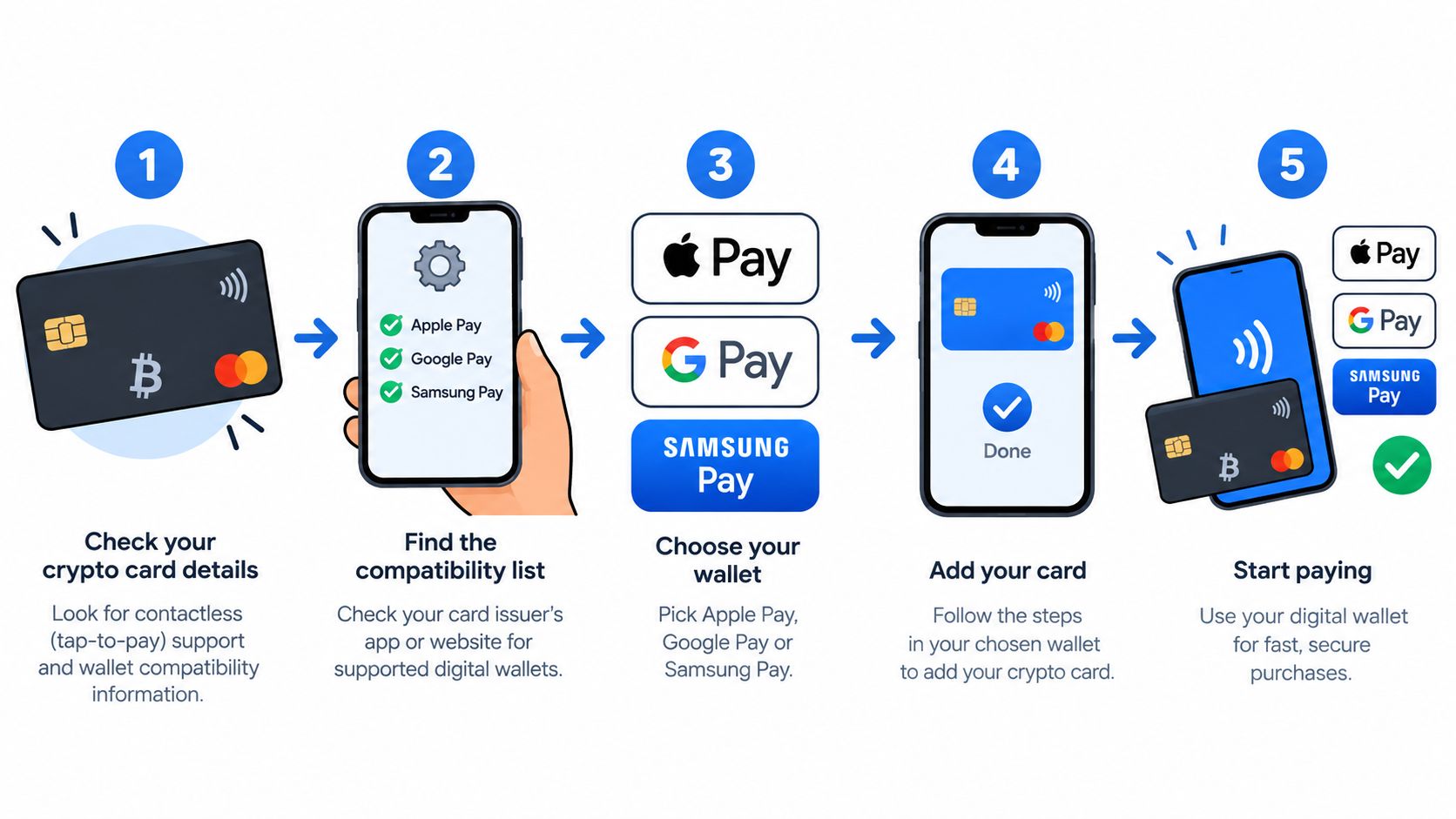
Find the issuer, card network, product type, and issuing country. Then look for an explicit statement covering the exact card, not a general claim that the company supports mobile wallets. Pay attention to differences between physical and virtual cards, debit and prepaid products, and cards issued in different regions.
If the documentation only says “mobile payments supported,” ask support four direct questions:
- Can this exact card be added to Apple Pay, Google Wallet, or Samsung Wallet?
- Is provisioning available in my country?
- Are in-store contactless payments supported after provisioning?
- Are recurring, transit, ATM, and cross-border transactions restricted?
A vague answer usually means you shouldn't assume full compatibility.
Verify the device and provisioning path
The wallet must recognize both your device and your account environment. Check that the operating system is current enough for the wallet, that NFC is available where required, and that the device isn't rooted, modified, or otherwise outside the wallet's eligibility controls. Samsung Wallet requires an eligible Galaxy device, while Apple Pay is limited to Apple's supported device ecosystem. Google Wallet's reach is broader across Android hardware, but issuer and country rules still apply.
Then add the card through the official wallet app. Don't infer compatibility from the fact that the card appears in your issuer's app. A card-management app and a network-token provisioning service are separate systems.
Read the error instead of retrying blindly
A rejected provisioning attempt can point to different causes:
- Issuer restriction: The product or region isn't enabled for token creation.
- Device restriction: The phone, watch, security state, or operating system isn't eligible.
- Verification failure: The issuer requires an additional identity check.
- Network or wallet issue: The request cannot complete even though the card should qualify.
Take a screenshot of the message and record the card type, country, device, and wallet. That information gives the issuer something actionable. Repeatedly deleting and re-adding the card won't solve a product-level restriction.
The same discipline applies after provisioning. Make a small in-store purchase, then test the transaction categories you need. A successful coffee purchase proves only that one contactless authorization worked.
For a troubleshooting checklist covering broader card declines, use this guide to crypto-card decline reasons and fixes. The core technical requirement remains the same across wallets: tokenized credentials, device authentication, and a cryptogram must reach the issuer in an acceptable authorization flow. The mobile-wallet security comparison from CNET describes those tokenization differences in more detail.
Regional Availability and Merchant Acceptance
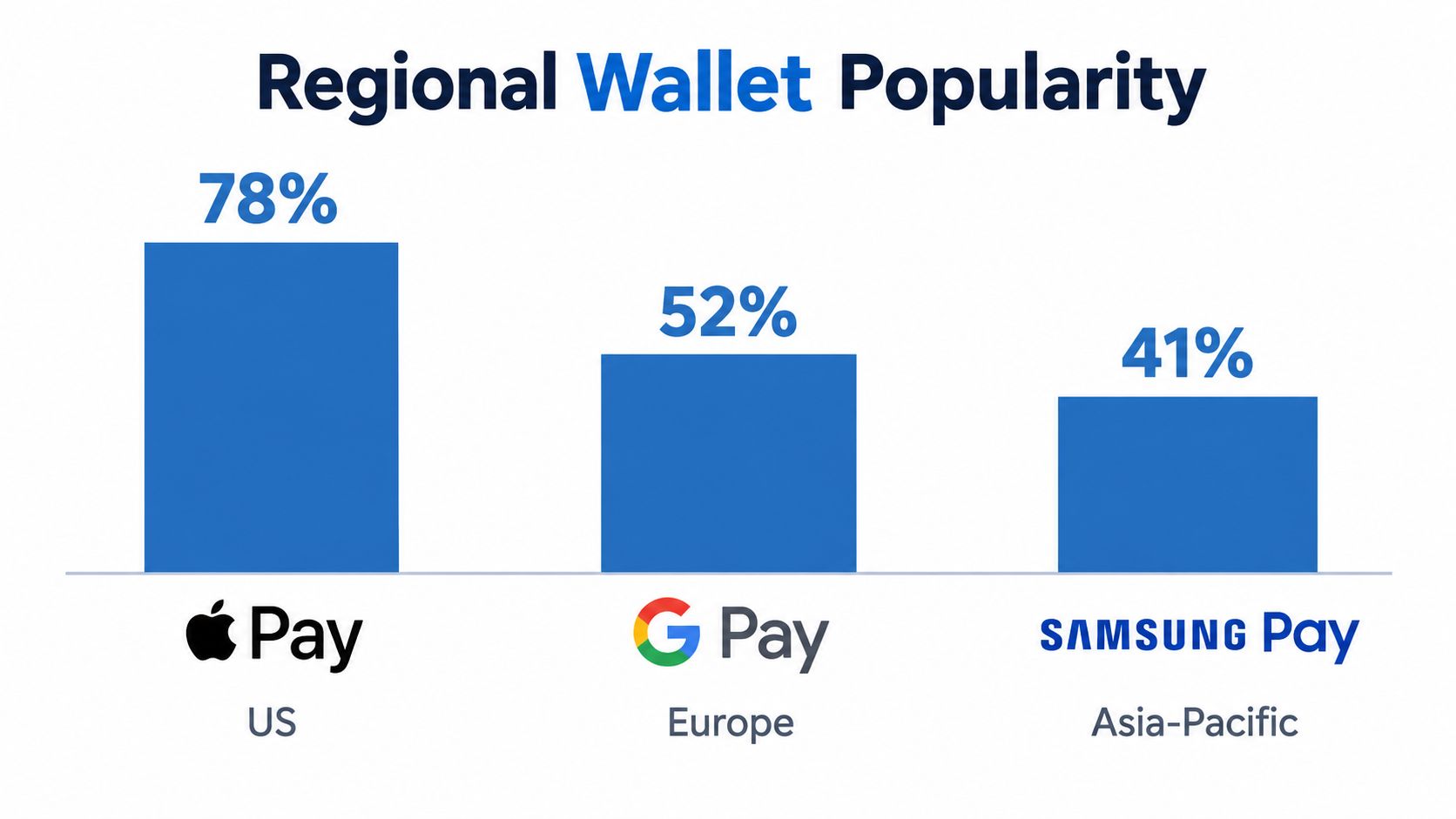
A wallet's name does not tell you whether your crypto card will work in a particular country. The practical result depends on issuer tokenization support, local wallet availability, device eligibility, and the payment rails merchants use. Apple Pay, Google Pay, and Samsung Pay may all appear at the same NFC terminal, yet they do not offer identical regional reach.
Apple Pay's estimated U.S. adoption reached 60.2 million users in 2024, equal to 21.2% of the U.S. population, compared with 55.8 million users in 2023. Its estimated U.S. physical-store purchase volume reached $268 billion in 2024, compared with $212.9 billion in 2023. These figures come from Apple Pay market estimates and indicate established use in physical retail. They still do not confirm that your crypto-card issuer permits Apple Pay provisioning.
India shows a different payment pattern. In July 2025, Google Pay processed 6.92 billion UPI transactions worth 8.91 trillion Indian rupees, representing 35.56% of total UPI transaction volume for that month, according to the reported Google Pay and UPI figures. UPI covers account-to-account payments, merchant payments, and peer transfers, so these figures cannot be compared directly with NFC card-wallet usage.
The same wallet name can describe a very different payment habit from one country to another.
Samsung Pay availability also depends on the market, supported device, issuer, and card type. Treat its regional reach as a separate compatibility question rather than assuming that Samsung hardware or a nearby NFC terminal guarantees acceptance. A card may work with Samsung Pay in one issuing market while remaining unavailable for provisioning elsewhere.
Acceptance has three layers
The terminal is only the first layer. An NFC-enabled merchant can generally accept contactless wallet payments without selecting Apple, Google, or Samsung separately. The issuer must still authorize the token, the wallet must be supported in that country, and the merchant must accept the relevant transaction category.
Check these points before travelling:
- Issuing country: Your card may qualify at home but face restrictions after a regional move.
- Wallet country: Feature access and verification requirements can change by market.
- Merchant channel: In-store NFC, online checkout, QR payment, transit, and ATM use are separate cases.
- Fallback method: Carry the physical card or another payment method if wallet provisioning remains uncertain.
A card that supports all three wallets can still have different practical reach depending on whether you spend at NFC terminals, online merchants, or account-to-account payment rails. Use this crypto-card usage guide for countries and payment contexts for travel planning, then confirm the issuer's current rules before relying on a wallet abroad.
Which Wallet Should You Choose for Your Crypto Card
Choose the wallet your card can provision reliably, not the wallet with the most attractive feature list. Device ownership comes next. Regional usage comes third, because a technically compatible wallet may have little value if it doesn't match how merchants in your destination accept payments.
Apple Pay suits an Apple-first spending routine
If you use an iPhone or Apple Watch and your issuer explicitly supports Apple Pay for your card, Apple Pay is usually the cleanest route for physical-store spending. The device ecosystem is controlled, the authentication flow is familiar, and the wallet's tokenized credential keeps the original card number away from the merchant.
The catch is eligibility. Apple-only hardware narrows your device options, and issuer support can differ between a standard debit product and a crypto-linked, prepaid, or virtual product. Don't treat a successful card activation as evidence that Apple Pay provisioning will work.
Google Wallet fits broader Android and India use cases
Google Wallet is the practical first test for users on Android hardware outside the Samsung ecosystem. It's also the more relevant starting point for users whose payment activity centers on India's UPI network, where Google Pay has measurable account-to-account scale rather than merely contactless card usage.
The catch is that Google Pay's global transaction picture isn't represented by one comparable public total. Regional wallet names also change, and the product shown on your phone may be Google Wallet even when an issuer's help page still says Google Pay. Confirm the current app and the exact card flow in your country.
Samsung Wallet makes sense for eligible Galaxy users
Samsung Wallet is worth testing when you use a current Galaxy device and your issuer lists Samsung provisioning for your card. Knox-backed device security and Samsung's integrated environment can make it a sensible choice, especially if you keep other passes and credentials in the same wallet.
The catch is outdated MST advice. Samsung Pay's original ability to imitate a magnetic-stripe transaction helped distinguish it from NFC-only wallets, but current comparisons shouldn't assume that legacy terminal behavior remains available. Modern acceptance depends primarily on NFC and the same issuer eligibility questions that affect the other wallets.
Use a compatibility-first decision
A practical order of operations looks like this:
- Confirm the issuer: Check the exact card product, network, country, and wallet approval.
- Check the device: Verify that your phone or watch is eligible for the wallet you want.
- Complete provisioning: Add the card and resolve any identity or issuer verification request.
- Run a small purchase: Test a physical transaction before traveling or leaving the physical card at home.
- Test your real use case: Check recurring billing, transit, ATM access, online checkout, or cross-border purchases separately.
Tokenization improves credential security across all three wallets, but it doesn't eliminate platform and issuer data access. A privacy-focused crypto user should therefore score security and privacy separately. The wallet may protect the card number at the terminal while the issuer still retains transaction records connected to the card account.
For comparing crypto-card terms before you start this process, NomadCards provides normalized information on networks, supported assets, card types, wallet features, verification requirements, custody models, fees, and regional availability. That kind of issuer-level detail is more useful than choosing a wallet from brand reputation alone.
Before you rely on a crypto card for everyday spending, verify the exact card, wallet, device, country, and transaction categories that matter to you. Compare compatible programs through NomadCards, then provision your preferred wallet and complete a small real-world test before traveling or leaving your physical card behind.