If you already use Cash App and there's money sitting there that you'd like to spend like a normal card, the question usually comes fast. Can I just get a card for this, tap it at a coffee shop, and move on with my day?
The Block debit card is that spending layer. It's a Visa debit card tied to your Cash App balance, with optional Bitcoin rewards in the app, so it works more like a front end to a stored balance than a full traditional checking account. That distinction matters, because the card is only one piece of a larger system, and crypto-heavy users often hit the seams first.
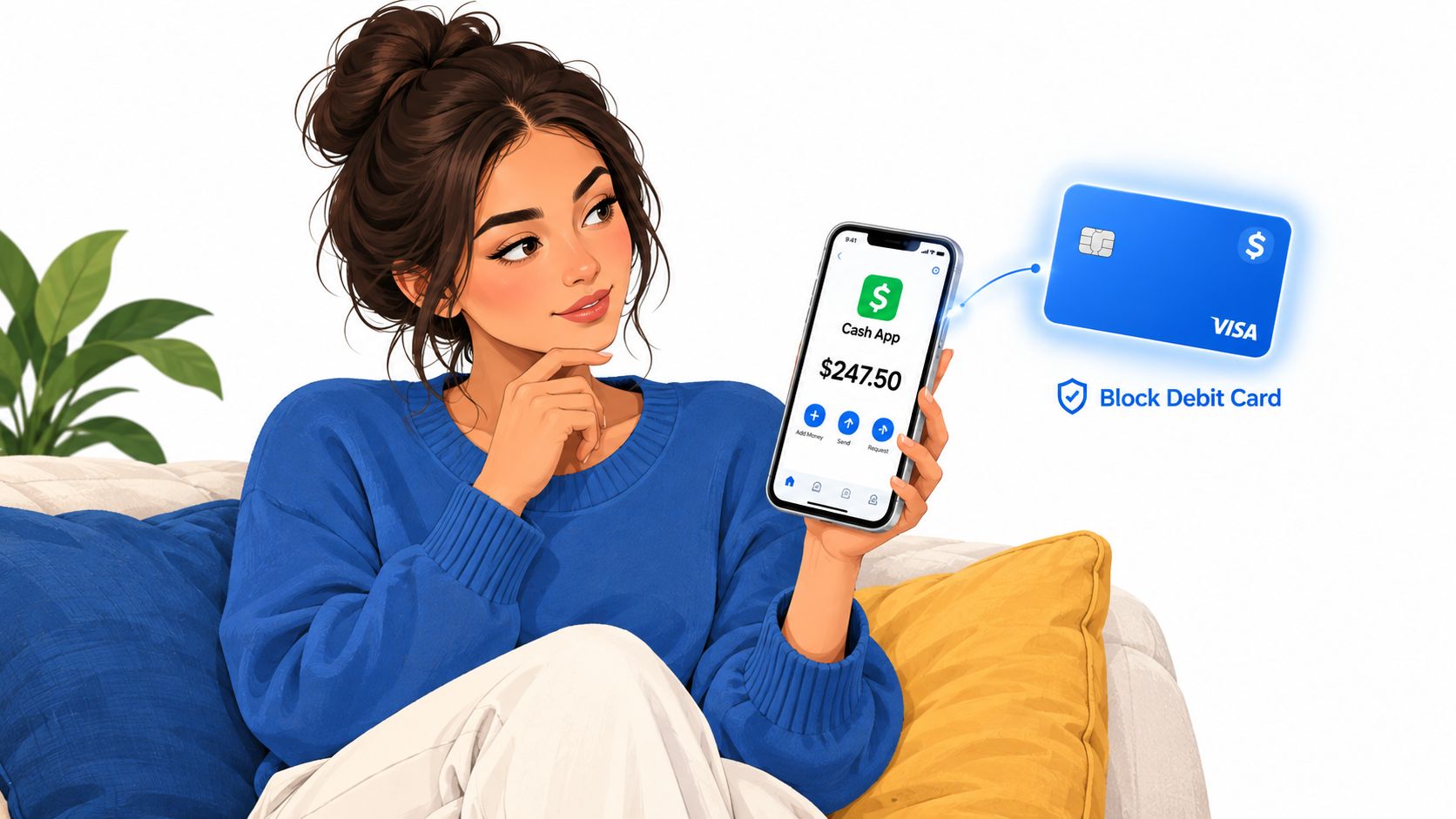
Table of Contents
- What the Block Debit Card Actually Is
- How the Card Works Under the Hood
- Fees, Limits, and the Numbers That Matter
- Crypto Features and Where the Card Stops Being Crypto
- KYC, Eligibility, and Who Can Get One
- How It Compares to Other Crypto-Linked Debit Cards
- Using the Card Day to Day Without Getting Burned
- Who Should Get It and Who Should Skip It
What the Block Debit Card Actually Is
You've got money in Cash App, and the practical question is simple. Can that balance act like a normal card balance at a store, online, or at an ATM?
Yes, but only within Block's payment stack. Block, Inc. is the company behind Cash App, and the card is a debit card, not credit. It spends from the Cash App side of the system, so when you swipe, tap, or enter the card online, you are using a balance stored in the app rather than borrowing from a revolving credit line.
The card is the visible layer, and the account behind it does the real work
That is where the confusion starts. The card feels like a banking product, but the day-to-day experience is closer to a wallet with a card attached. If you already use Cash App, the card is the part that lets that balance leave the app and function in the world.
The key idea is straightforward. The card is the front end, Cash App holds the balance, and Visa moves the payment request for approval. If one layer is unavailable, the card can fail even when the others look normal.
Practical rule: if the Cash App balance is not there, the card cannot create spending power on its own. It only spends what the account makes available.
Block builds this as a full payments stack, not a standalone card program. That matters because the card is only one piece of the experience, and crypto-heavy users are often the first to notice where the card stops and the app starts.
How the Card Works Under the Hood
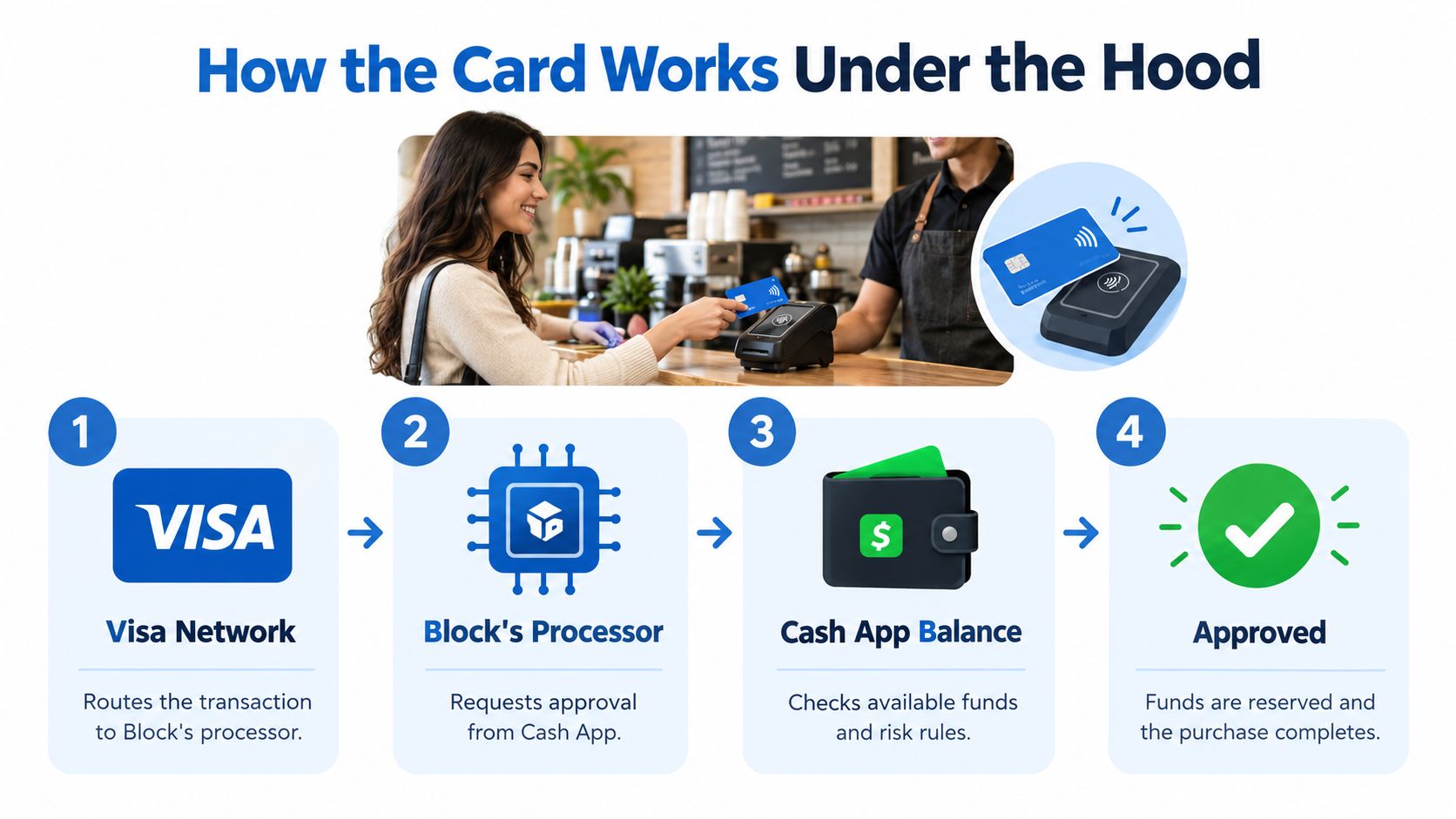
A coffee purchase shows the flow clearly. You tap the card, the terminal sends an authorization request through Visa, Block checks the account, and the merchant receives an approval or a decline.
The stack in plain English
The Visa network routes the payment request to Block's processor, which asks Cash App whether the purchase should go through. Cash App checks the available balance and its risk rules, then sends back an approval or a decline.
That is why the card can feel instant. The decision happens at authorization time, before the merchant finishes settlement. A card can be blocked, limited, or challenged even when the app balance looks fine to the user.
The optional Bitcoin rewards layer works separately. If you turn it on, Cash App can apply rewards in Bitcoin after the card transaction, but Visa itself still processes a dollar purchase at the point of sale. The card settles in dollars first, then the app handles the reward inside the account.
Cash App also uses a custodial structure for balances, which helps explain why available funds, settlement timing, and rewards do not behave like a wallet-native crypto card. The money sits inside Block's system, then moves through the card rails when you spend it.
For a closer look at the engineering side of that stack, the Blockchain Jobs staff engineer opening gives a sense of how much is happening behind one tap.
The short walkthrough below shows the authorization flow end to end.
Fees, Limits, and the Numbers That Matter
The card is attractive partly because the fee story is simpler than a lot of crypto-linked alternatives. The details still matter, though, because a “cheap” card can get expensive if you use the wrong ATM, move money the wrong way, or hit a quiet limit.
What you'll actually run into
Cash App's standard card doesn't depend on a monthly subscription model, but the cost picture lives in the edges. ATM behavior, instant funding, and Bitcoin-related actions are where users usually notice friction. If you compare options side by side, it helps to scan the fee structure before you care about rewards, which is why a neutral comparison tool like the crypto card fees comparison is useful when you're weighing alternatives.
| Block debit card fees and limits at a glance | Cost or limit |
|---|---|
| Monthly card fee | No monthly fee |
| Standard overdraft fee | No overdraft fee on the standard card |
| ATM withdrawals | In-network allowance plus a per-transaction out-of-network fee |
| Instant deposit | Fee applies |
| Bitcoin withdrawal | Fee applies |
| Spending, withdrawal, and ATM limits | Apply by account and verification status |
| Cash App balance cap | Maximum balance applies |
| Sending limits | Rise with verification |
The quiet part is that the ceiling isn't just about how much you want to spend. It's also about what the app has verified about you. If you haven't completed the higher verification steps, your usable limits can be tighter than the card face suggests.
The limits people miss
ATM use is the one that catches travelers most often. An out-of-network machine can turn a simple cash withdrawal into a frustrating surprise, especially if you expected the card to work everywhere a Visa debit card normally works. Hotel and rental-style holds can also reduce available funds temporarily, which makes a card with a modest balance feel smaller than it is.
The cleanest habit is to treat the card like a spending rail, not a cash-rich reserve. Keep a buffer, know where your ATM access is strongest, and assume that some funding actions will be slower or more expensive than the purchase itself.
Crypto Features and Where the Card Stops Being Crypto
A lot of people hear “crypto card” and assume the card spends crypto directly. That's not what this one does.
What the crypto side actually is
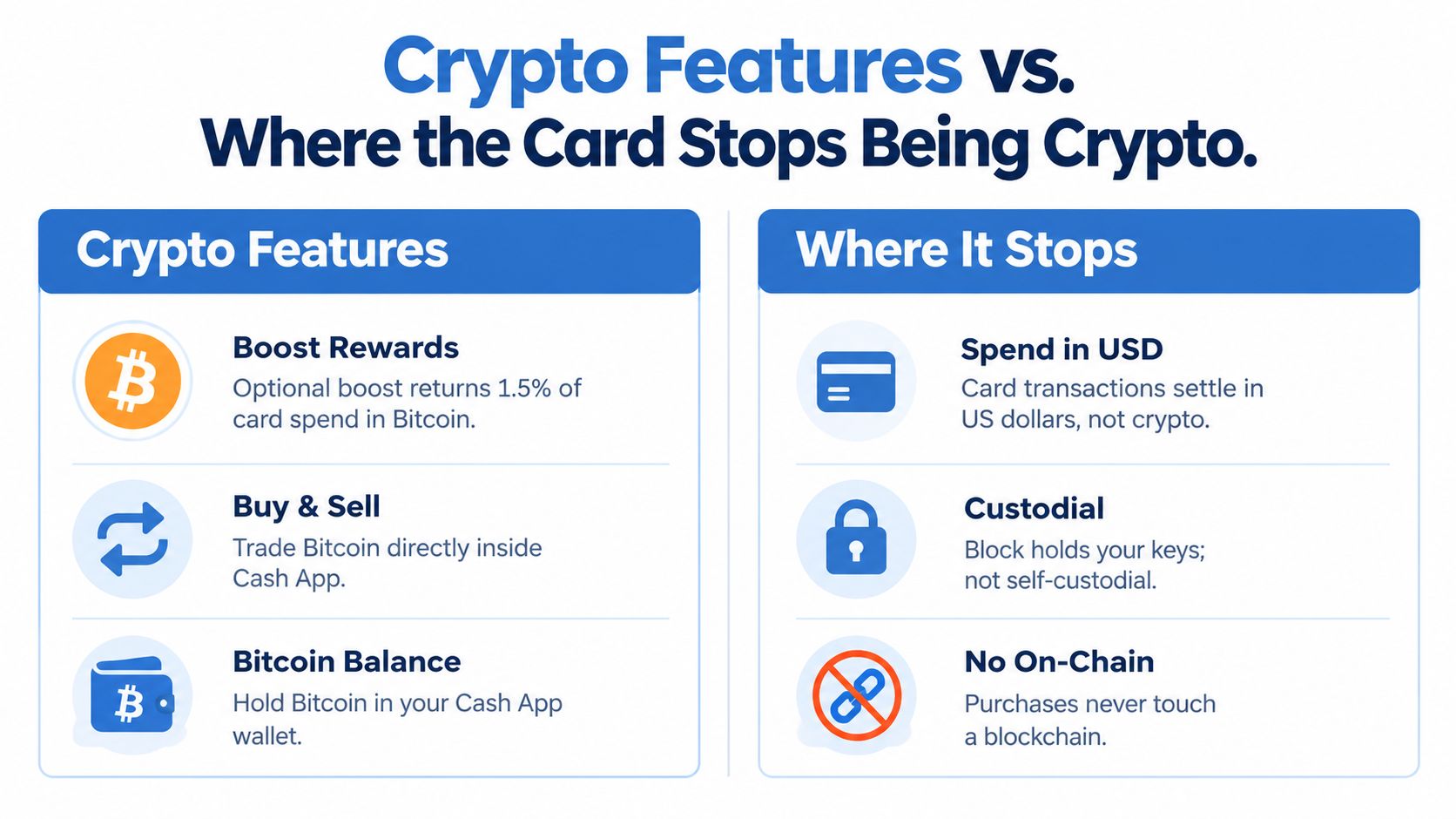
The crypto story here is mainly Bitcoin rewards and in-app buying and selling. If you use the Boost-style reward setup, the card can return Bitcoin on spend, and you can also hold Bitcoin inside Cash App's custodial wallet. That makes it useful for users who want to accumulate BTC without leaving the app every time they earn or buy.
What it doesn't do is spend from an on-chain wallet at the register. The card transaction still settles in fiat, not on a blockchain. So if you're coming from a self-custodial mindset, this is the key limitation: the card is crypto-adjacent, not wallet-native.
Where the seams show up
That line matters when you compare it to other card styles. Self-custodial cards are built around your wallet and your keys. Exchange-linked cards usually auto-convert a hosted crypto balance into fiat at the moment of sale. Block sits in a different lane, because the debit card spends your Cash App balance and only the reward layer touches Bitcoin.
Bottom line: this card is good for people who want Bitcoin exposure as a reward, not for people who want every purchase to draw directly from crypto holdings.
That means Bitcoin bought or earned in the app remains custodial until you move it elsewhere, and moving it can involve network fees. So the product works well as a simple consumer bridge, but it isn't the right tool if your goal is pure on-chain spending.
KYC, Eligibility, and Who Can Get One
The card is built for a mainstream U.S. audience, not for someone looking for a privacy-light workaround. That means identity checks are part of the experience.
What you usually need
Expect to provide the usual verification details, then more if you want stronger functionality. At the basic level, you'll need a legal name, address, phone number, and the last four digits of your SSN for higher-trust account usage. Cash App also uses identity verification to enable broader sending and ATM behavior.
The easiest way to think about this is that the app separates casual setup from full card usefulness. If you only want a minimal profile, you may find the experience constrained. If you complete the verification path, the card becomes more practical for day-to-day use.
For readers comparing privacy posture, a useful reference point is the crypto card KYC levels explained. That comparison helps place Cash App on the more verified end of the spectrum rather than the no-KYC or email-only side.
Who the card fits
U.S. residents are the natural fit, especially if they already live inside Cash App. If you're outside the U.S., want a card that spends directly from crypto, or prefer minimal identity checks, this probably isn't your best match.
A practical checklist makes the process smoother:
- Legal name: Use the name that matches your identity documents.
- Address: Keep it consistent with your account profile.
- SSN last four: Be ready for higher verification.
- Phone number: Make sure it can receive SMS verification.
If those details are in place, the card setup tends to feel more like a standard financial onboarding flow than a crypto-native one.
How It Compares to Other Crypto-Linked Debit Cards
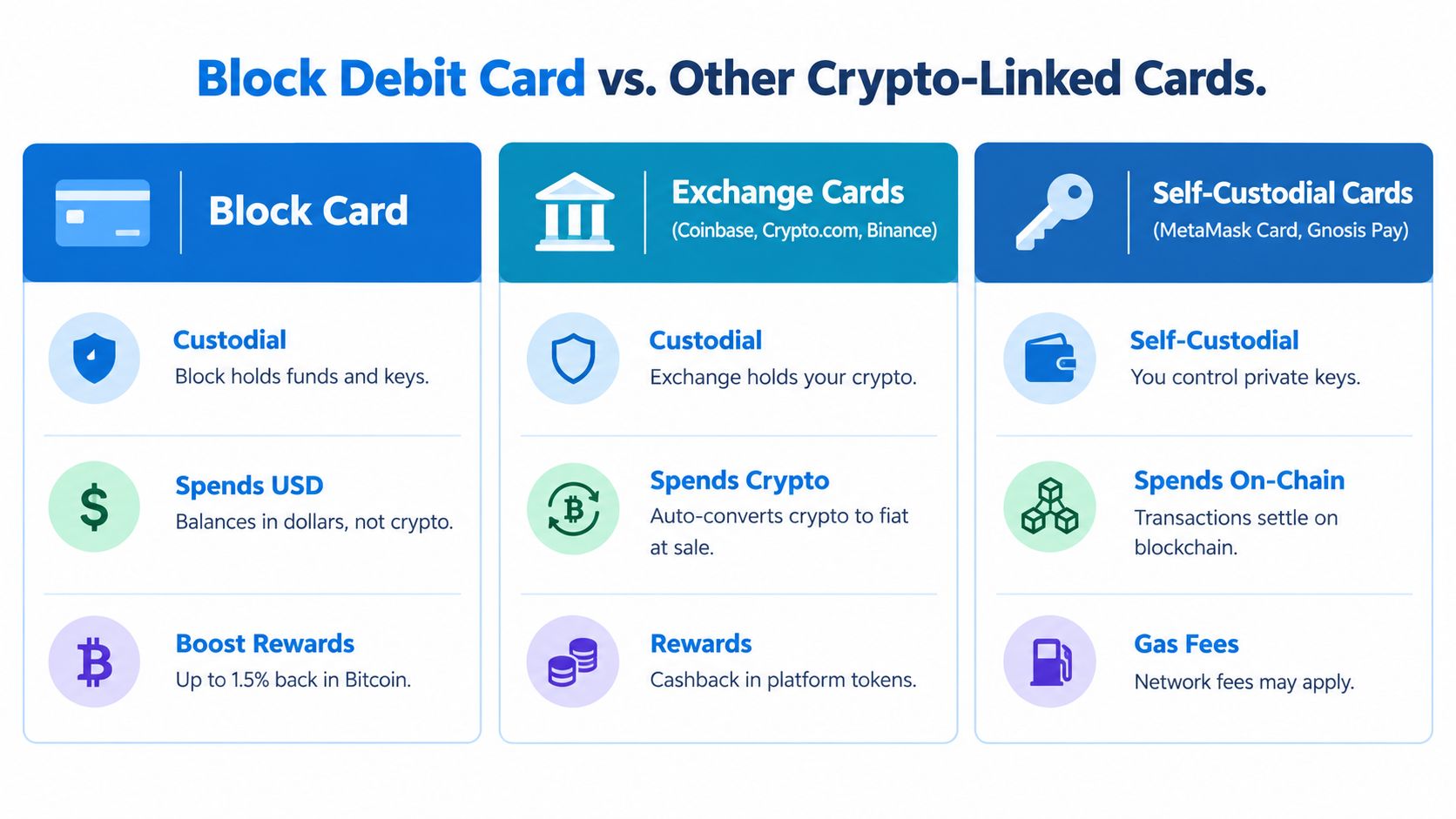
A Block debit card sits in a layered setup. Your Cash App balance funds the spend, Visa handles the payment rail, and Bitcoin rewards are optional on top. That makes it familiar for everyday purchases, but less interesting if you want a card that behaves like a crypto wallet at checkout.
The trade-off map
| Card type | Custody model | What it spends | Rewards or upside | Main trade-off |
|---|---|---|---|---|
| Block card | Custodial | USD balance in Cash App | Bitcoin rewards in the app | Less crypto-native control |
| Exchange cards | Custodial | Auto-converted crypto or hosted balance | Platform rewards, often in platform tokens | Depends on exchange stack |
| Self-custodial cards | Self-custodial | On-chain wallet value | Wallet-linked spending | More setup and more moving parts |
A 2025 consumer survey on card declines helps explain why some users accept that friction. About one in five respondents had seen a debit-card decline flagged as suspected fraud, while roughly 69% preferred banks to decline suspicious purchases and 70% wanted issuers to keep stopping them. That kind of response makes a stricter card system easier to understand, even if it feels annoying at the register. For a wider comparison, the best crypto cards list is a useful reference point.
Block is a U.S.-centric, KYC-required, convenience-first card with Bitcoin rewards. It fits people who already use Cash App and want a normal spending experience with a crypto reward layer attached. It fits less well if you want direct stablecoin spending, self-custody, or travel-oriented perks.
Exchange cards usually sit closer to the crypto platform itself. They may auto-convert digital assets for spending, but they still depend on the exchange's rules, account status, and payment stack. Self-custodial cards go one step further, because they try to spend from wallet-held value, which gives crypto-native users more control but also more setup and more points of failure.
For a Block user, the seam shows up where the crypto part stops. You can earn Bitcoin, but the card still behaves like a standard debit card funded by cash inside an app. That is useful if you want simple payments. It is less satisfying if your goal is to spend crypto directly, keep funds in your own wallet, or reduce reliance on a custodial platform.
Using the Card Day to Day Without Getting Burned
A Block debit card is easy to use on a normal day and easier to trip up on a messy one. The rough spots usually show up with travel, merchant holds, or transaction patterns that look unusual to the issuer.
What trips people up
ATM withdrawals can fail if you use the wrong machine or expect every ATM to behave the same way. Online checkout can also work differently from an in-person tap, especially when a merchant runs an extra authorization check or places a temporary hold. Hotels and rental counters can tie up part of your available balance for a while, even if you have not spent the full amount yet.
Recurring bills deserve special care. If the Cash App balance is low, a subscription can fail even when the card itself is active. A freeze or block can also stop new purchases while some preauthorized or recurring items still go through, so do not assume every card action has the same result.
Practical rule: when a payment fails, read the decline reason before you try again. Repeated declines can count against risk scoring, so verify the cause first.
Visa's authorization systems can inspect up to 400 transaction attributes (source), with additional rule sets layered on top. That is why a single odd transaction can trigger a block in seconds even when the balance looks fine. For crypto-related spending, a sudden merchant change or geography shift can look risky to the issuer. A blocked card is not always a balance problem, and it is not always permanent.
A simple travel checklist
- Verify international use: Check the setting before you leave.
- Keep a backup card: Do not rely on one rail for hotels or transport.
- Watch ATM choice: Use a machine you trust, not the first one you see.
- Keep extra fiat ready: Holds and delayed settlements can bite.
- Do not spam retries: A repeated decline can worsen the risk picture.
A common support case looks like this. Someone makes a crypto-related purchase, the system flags unusual activity, and the card locks. The fastest path is usually to verify the transaction, confirm the issuer's request, and wait for the hold to clear rather than pressing the card again.
Who Should Get It and Who Should Skip It
If you already live in Cash App, want a no monthly fee debit card, and like the idea of earning Bitcoin instead of chasing complicated crypto perks, this is a sensible card. It's simple, familiar, and good for everyday spending.
Skip it if you're outside the U.S., want to spend crypto directly, need self-custody, or care more about privacy-minimal onboarding than mainstream convenience. The card's strength is that it feels close to ordinary card use, and its weakness is the same thing.
The clean decision rule is this. Choose Block if you want a Cash App spending layer with BTC rewards. Look elsewhere if you want on-chain spending, stronger travel features, or a card that treats privacy and crypto native control as the main event.
If you're comparing this card with other crypto-linked options, NomadCards makes that research faster by lining up fees, custody, KYC, rewards, and regional availability in one place. Visit NomadCards to check how Block stacks up against the rest before you apply.