No. Apple Pay and Google Pay aren't interchangeable wallets: Apple Pay was observed on about 647,000 domains and Google Pay on about 540,000. They can still work at the same contactless payment terminal, because the terminal can accept payment tokens from either wallet.
So why do people keep asking, “Is Google Pay compatible with Apple Pay?” The confusion comes from treating compatibility as one yes-or-no feature. In practice, it depends on three separate layers: the device in your hand, the merchant terminal in front of you, and the payment protocol connecting the two.
Table of Contents
- The Short Answer and Why It Feels Confusing
- Two Wallets, One Terminal, A Simple Analogy
- What Compatibility Actually Means in Mobile Payments
- Apple Pay and Google Pay by the Numbers
- Where the Two Wallets Meet and Where They Don't
- What Crypto Card Users Should Know About Both Wallets
- The Mental Model to Carry to the Checkout
The Short Answer and Why It Feels Confusing
Google Pay and Apple Pay aren't interchangeable. Apple Pay belongs to Apple's device ecosystem, while Google Pay, now commonly presented through Google Wallet features, belongs to Android and Google-supported devices. You can't put an Apple Wallet payment credential inside Google Pay, and you can't make an iPhone use Google Pay as its native contactless wallet.
The one genuine point of cooperation is at the checkout terminal. A merchant can accept both wallets side by side, even though the wallets don't exchange information with each other. In fact, a 2026 technology-detection study found that Google Pay gained 12,687 domains from Apple Pay while losing 13,649 domains to it, a pattern that suggests many merchants support both rather than choosing one exclusively. The technology-detection data on Google Pay deployment reflects the practical reality: shared acceptance is common, wallet substitution isn't.
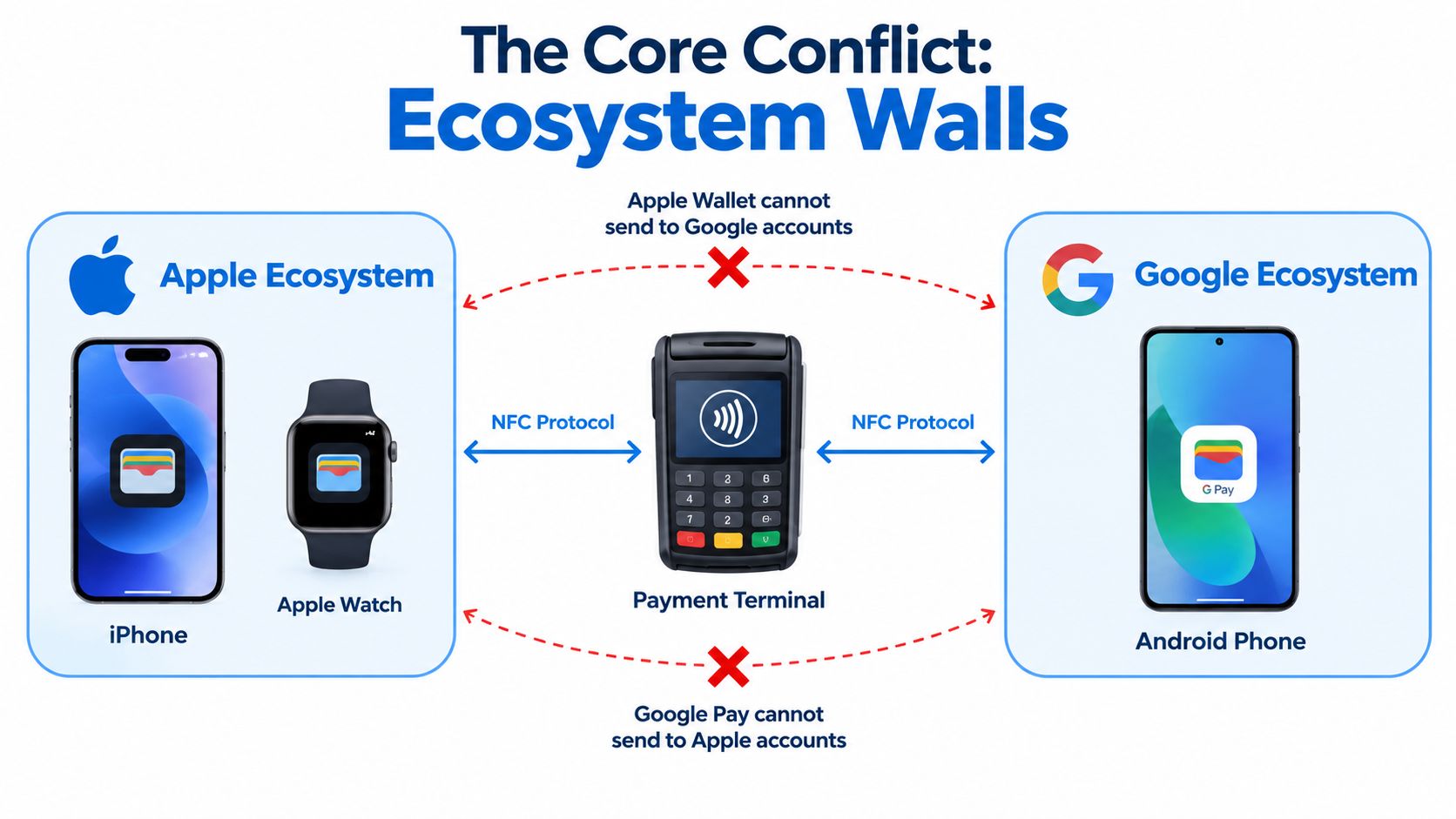
The three questions to ask
- Device compatibility: Can your phone or watch run the wallet's native tap-to-pay function?
- Merchant compatibility: Does the store's reader accept contactless payments from that card network?
- Protocol compatibility: Can the wallet create and present a secure payment token that the reader understands?
Consider an iPhone owner with a Visa card at a coffee shop. Apple Pay can tokenize that card and present it to a compatible reader. The same person can't send an Apple Pay wallet credential directly to an Android friend's Google Pay account, because a store payment and a person-to-person transfer use different rails.
That distinction is the key. If you're asking whether both wallets can pay at the same shop, the answer is often yes. If you're asking whether one wallet can replace, sync with, or transfer directly to the other, the answer is no.
Two Wallets, One Terminal, A Simple Analogy
Think of Apple Pay and Google Pay as two different remote controls for the same television. Each remote belongs to a different manufacturer and is designed to work with its own equipment. Neither remote can send a command into the other remote, but both can control a television that understands the shared signal.
The wallet is the remote. Your phone supplies the hardware and security checks. The merchant's contactless terminal is the television. When you tap, the terminal isn't asking whether the phone uses Apple Pay or Google Pay as a brand preference. It's processing a tokenized card payment through the contactless payment language it supports.
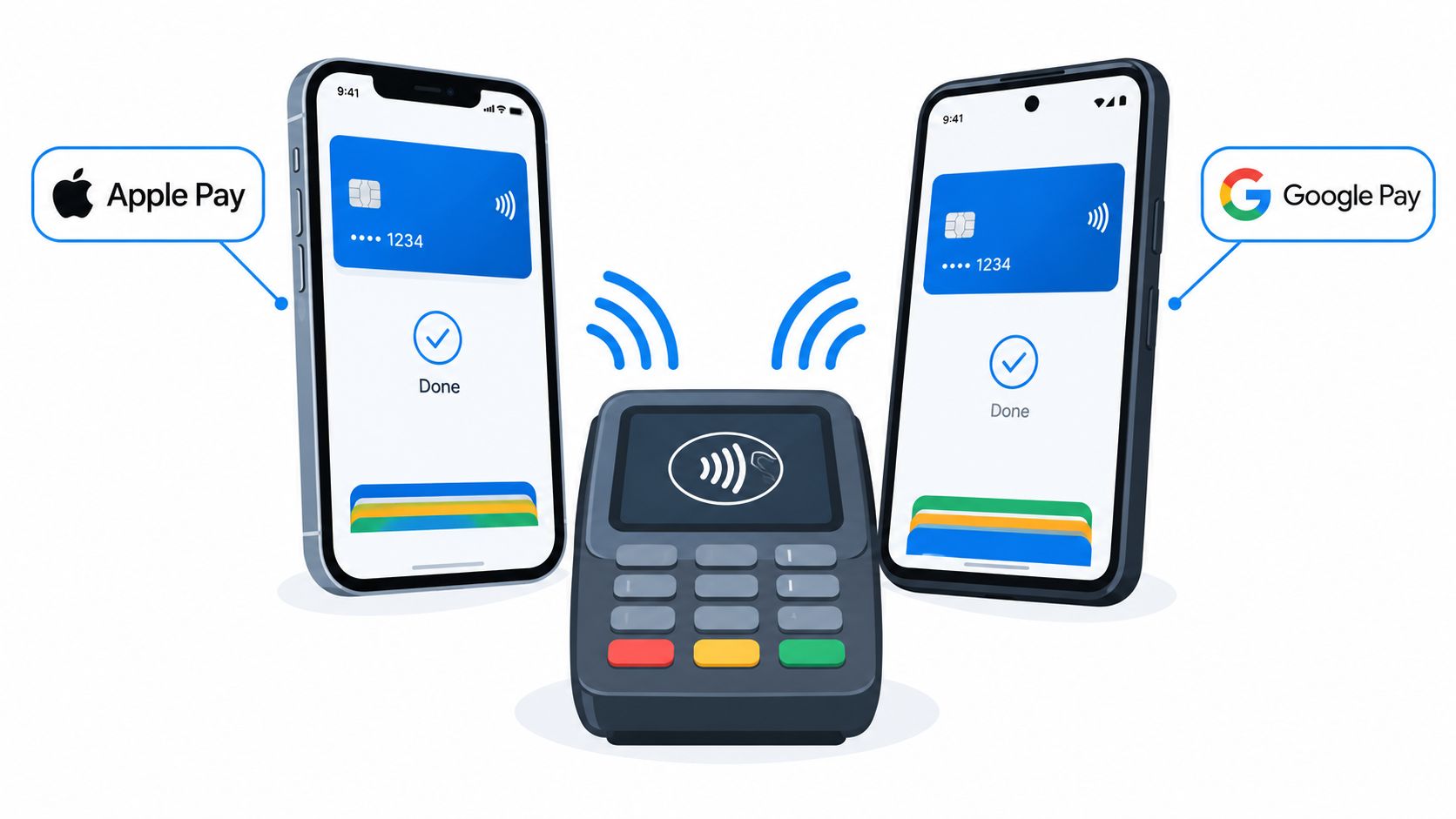
This is why a retailer can display both Apple Pay and Google Pay acceptance without merging the services. The terminal receives a valid contactless credential, routes the transaction through the relevant card network, and never needs the two wallets to communicate. A tap from an iPhone and a tap from an Android phone can reach the same checkout system through separate wallet paths.
Practical rule: The terminal needs to understand the payment credential, not the other wallet.
The same analogy also explains the boundary around sending money. A television remote can change the channel, but it can't hand another remote a personal message. Likewise, a merchant terminal can accept payment tokens from both wallets, but Apple Pay doesn't become a bridge into a Google account.
This shared-terminal model is useful for online checkout, too, although the experience depends on the browser, device, merchant setup, and region. A website may offer both payment buttons, but each button opens its own wallet flow. One doesn't take over the other.
What Compatibility Actually Means in Mobile Payments
The word compatible hides three different tests. Separating them prevents the most common wallet mix-ups.
Device compatibility
Device compatibility asks whether the wallet can perform the action on your hardware. Apple Pay is tied to Apple devices, while Google Pay's tap-to-pay function is designed for Android devices and supported Wear OS devices. An iPhone may allow some Google account or card-related functions, but that isn't the same as using Google Pay for native contactless checkout. This device-focused explanation of Google Pay on iPhone makes the distinction clear.
Merchant compatibility
Merchant compatibility asks whether the reader accepts the payment method. A modern contactless terminal often accepts both wallets because it processes tokenized card payments through supported networks. That doesn't guarantee every retailer accepts NFC payments, however, and a merchant can choose a proprietary checkout method instead.
For businesses evaluating payment acceptance, the terminal and acquiring setup matter more than whether customers carry iPhones or Android phones. A useful overview of the wider merchant side is this guide to direct-to-consumer payment processing, especially when a seller wants to support wallet payments alongside cards and other checkout methods.
Protocol compatibility
Protocol compatibility is the technical layer underneath the branding. Both wallets use EMVCo-style tokenization, which replaces the card number with a device-linked payment token. The implementation differs: Apple Pay stores the device account token in a hardware Secure Element, while Google Pay uses a virtual account number token and device-side key material for transaction cryptograms. This technical comparison of Apple Pay and Google Pay tokenization explains why both can reach the same reader while still requiring separate provisioning.
| Layer | Apple Pay | Google Pay |
|---|---|---|
| Device | Native to Apple devices | Native tap-to-pay on Android and supported Wear OS devices |
| Merchant | Works where the terminal accepts contactless card payments | Works where the terminal accepts contactless card payments |
| Protocol | Uses tokenization with a hardware Secure Element | Uses tokenization with a virtual account token and device-side key material |
Wallet-to-wallet transfers sit outside this table. A personal transfer isn't a terminal authorization, so shared NFC acceptance doesn't create a path between an Apple account and a Google account.
Apple Pay and Google Pay by the Numbers
The adoption picture explains why merchants commonly support both wallets, even though users can't swap one for the other. One 2026 survey-style compilation estimated about 507 million Apple Pay users worldwide and about 150 million Google Pay users worldwide, while the same comparison source cited Apple Pay acceptance in 94 countries and Google Pay support in 70 or more countries. The published digital wallet statistics and estimates show that the two services operate at substantial scale, but not with identical reach.
| Metric | Apple Pay | Google Pay |
|---|---|---|
| Estimated worldwide users | About 507 million | About 150 million |
| Cited country reach | 94 countries | 70+ countries |
| Estimated active U.S. users in 2025 | About 65.6 million | Roughly 35 million |
| U.S. in-store mobile-wallet taps in a 2024 estimate | About 54% | About 30.1% |
| Typical strength | Apple device integration and in-store contactless use | Android reach and regional payment functions |
The United States shows a particularly clear difference in usage intensity. One estimate reported about 55.8 million U.S. consumers made an in-store Apple Pay payment in April 2023, while another estimate put active U.S. users in 2025 at about 65.6 million for Apple Pay and roughly 35 million for Google Pay, all from the comparison data linked above.
Those figures don't turn Apple Pay into a universal winner. A wallet's practical value depends on the phone a customer owns, the country where the card was issued, the merchant's acquiring setup, and whether the user needs tap-to-pay, online checkout, or a local payment rail. Google Pay can be the more relevant option for an Android user or in a market where Google supports functions that Apple Pay doesn't replace.
The useful conclusion is narrower than “which wallet is bigger?” Both have enough merchant presence to matter. The choice usually begins with the operating system, then moves to local availability and card issuer support.
Where the Two Wallets Meet and Where They Don't
At a contactless checkout, the boundary is easy to miss because the result looks identical. An iPhone user selects a card in Apple Wallet, authenticates, and taps. An Android user selects a card in Google Wallet, authenticates, and taps. If the terminal accepts the relevant contactless payment scheme, both transactions can complete without either wallet interacting with the other.
That doesn't mean every store accepts both. The merchant must support contactless payments, and the card, wallet, country, and terminal configuration must line up. A retailer can also promote its own app or QR-based method instead of accepting NFC wallets. For country-specific merchant guidance, a resource such as Apple Pay in Singapore for merchants is more useful than assuming that acceptance works identically in every market.
Sending money to a friend
A personal transfer is a different event from tapping a card at a register. Apple users may use Apple's own account-based transfer features, while Google users use Google's separate payment functions where available. Neither wallet turns a payment token into a transferable balance for the other ecosystem.
So an iPhone user can't open Apple Pay and send an Apple Pay wallet credential directly to a friend's Google Pay account. The friend may still receive money through a separate service that supports both people, but that service is acting as its own payment rail.
Traveling across borders
Travel adds another variable: the card network and local payment infrastructure. Apple Pay acceptance is cited in 94 countries, while Google Pay support is cited in more than 70 countries, but those headline figures don't tell you whether a particular card issuer, transit system, merchant, or local feature will work for your trip. Recent regional coverage of Apple Pay and Google Pay in India illustrates why a wallet's role can change by market, especially where Google Pay connects to local payment functions that Apple Pay doesn't replace.
Before traveling, check the card issuer's supported countries and carry a backup payment method. For crypto-card users, it's also useful to review where a crypto card can be used, because wallet support doesn't override card-program restrictions.
Online checkout and subscriptions follow the same pattern. A website may present both buttons, but the Apple Pay flow stays within Apple's supported device and browser environment, while Google Pay follows Google's supported environment. Shared availability on a checkout page is parallel access, not synchronization.
What Crypto Card Users Should Know About Both Wallets
A crypto-linked Visa or Mastercard-backed card can sometimes be added to Apple Wallet and Google Wallet, but adding it to one doesn't automatically add it to the other. Think of the card account as the underlying asset and each wallet as a separate device-specific access token.
When you add the card to Apple Wallet, the issuer provisions an Apple-specific token. When you add the same card to Google Wallet, the issuer provisions a separate Google-specific token. The underlying card account may point to the same crypto spending balance, but the two wallets don't sync their credentials or share transaction authorization.
Adding the same card twice
The practical sequence is straightforward:
- Add the card to Apple Wallet on the Apple device where you'll use it.
- Complete any issuer verification required for that wallet.
- Add the card separately to Google Wallet on the Android device you plan to carry.
- Complete the issuer's checks again if requested.
Moving from iPhone to Android can trigger a new verification step because the issuer is registering a new wallet and device combination. Replacing a phone can require another provisioning event as well. A virtual card's existence in your account doesn't guarantee that every device or region can tokenize it.
Region and backup considerations
Issuer geography matters. A card program may support Apple Pay in one market and Google Wallet in another, or limit both based on the cardholder's country, compliance requirements, or network rules. Switching a device's region can't reliably remove those issuer restrictions, because eligibility is usually tied to the card program and account.
Keep a physical card or another approved payment option for travel and device loss. Also check whether the card is debit, prepaid, or credit, since that classification can affect wallet eligibility and merchant authorization. A detailed guide to using a crypto card with Apple Pay and Google Pay can help you verify the setup before relying on it at checkout.
The sensible approach is to treat each wallet token as a separate key to the same account. Add only the devices you control, keep issuer contact details available, and test a small purchase before traveling or moving to a new phone.
The Mental Model to Carry to the Checkout
The answer to “is Google Pay compatible with Apple Pay?” becomes much easier when you stop asking whether the apps merge. Ask three smaller questions instead:
- Which device owns the wallet? Apple devices use Apple Pay for native contactless payments, while Android devices use Google Pay or Google Wallet.
- Which terminal accepts the tap? A compatible NFC reader can often accept tokens from both ecosystems.
- Which rail are you using? A store purchase, online checkout, and personal transfer are different payment flows.
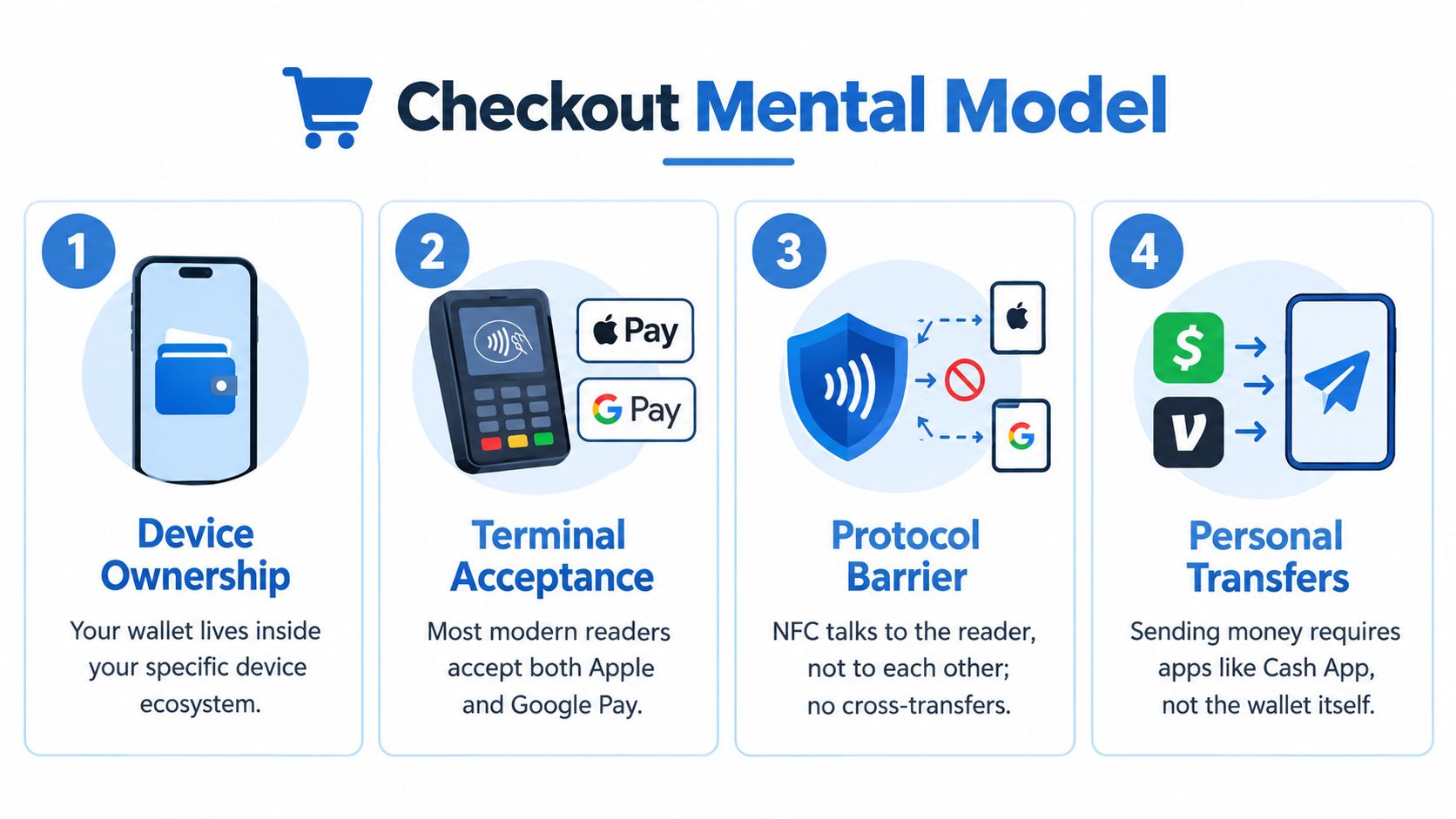
The misconception to drop is that tapping an iPhone somehow involves Google Pay, or tapping an Android phone somehow involves Apple Pay. The merchant sees a valid tokenized card transaction. The wallet stays inside its own device ecosystem.
Before you leave for the checkout line, use this quick test:
- Your phone: Is the card provisioned in the wallet native to your device?
- The store: Does the reader display or support contactless payments?
- The card: Does the issuer permit that wallet, country, and transaction type?
- The backup: Do you have another payment method if the card is declined?
If a card is rejected, the problem may be issuer approval, wallet provisioning, merchant acceptance, or regional eligibility. This guide to crypto card declined reasons and fixes is a useful next step when the terminal, rather than the wallet brand, appears to be the problem.
As NFC acceptance spreads, the wallet brand matters less at a compatible terminal. It still matters at the device layer, during card setup, and whenever you want to send money to another person.
NomadCards compares crypto-linked debit and credit cards by wallet support, network, fees, supported assets, KYC requirements, and regional availability. Visit NomadCards to compare card programs and check whether a card fits the Apple Pay or Google Pay setup you use.