Your basket is ready, your wallet holds USDC, and the checkout only shows card logos. There's no wallet address, no network selector, and no obvious way to spend the balance you already have. You can still pay with crypto, but the route matters more than the coin.
A wallet transfer, a stablecoin invoice, and a crypto-linked card solve different problems. They also leave different receipts, charge different fees, and give you different options when something goes wrong. Start with what the recipient accepts, then choose the payment rail.
Table of Contents
- Four Ways to Pay With Crypto
- How to Send an On-Chain Checkout
- How to Pay a Normal Shop With a Crypto Card
- Fees Spreads and Failed Quotes
- Refunds Privacy and What Can Go Wrong
- Check Card Terms Before You Load One
Four Ways to Pay With Crypto
A shop that accepts Visa hasn't necessarily agreed to accept Bitcoin. Before opening your wallet, identify which of these payment routes the checkout supports.
An on-chain merchant payment sends an asset to the destination specified by the seller. The merchant receives crypto, and your blockchain transaction ID proves that a transfer occurred. It doesn't, by itself, prove that the merchant matched it to your order.
A stablecoin checkout starts with an invoice or payment link. The processor specifies an asset and network, then may convert the payment so the merchant receives money in a bank account.
A crypto card connects your balance to an ordinary card transaction. You spend from crypto, but the merchant receives fiat through its card-acquiring arrangement.
A person-to-person transfer sends crypto to someone's wallet. It suits an agreed payment to a friend, relative, or freelancer, not a shop that has supplied only a card terminal.
Which Crypto Payment Fits This Checkout
| Method | Where it works | Recipient gets | Typical speed | Main cost | Privacy |
|---|---|---|---|---|---|
| On-chain to a merchant address | Shops that publish crypto payment instructions | The coin itself | After the merchant's required confirmations | Sender pays the network fee unless sponsored | Public ledger; merchant identity checks may still apply |
| Stablecoin checkout | Supported invoice or payment link | USDT, USDC, or PYUSD, potentially converted to fiat | Within the processor's confirmation and reconciliation window | Network fee plus any conversion charge | Address screening and possible customer checks |
| Crypto card | Eligible merchants accepting its Visa or Mastercard network | Fiat through the card network | Authorization at checkout; settlement follows | Conversion spread, possible FX and card fees | Merchant sees a card; issuer may require identity verification |
| Person to person | An agreed recipient with a compatible wallet | Crypto in their wallet | After the recipient's required confirmations | Network fee | Public history can connect both addresses |
Choose Acceptance Before Assets
Holding crypto is much more common than buying with it: the Federal Reserve's household survey found that 7% of U.S. adults bought or held cryptocurrency as an investment during the previous twelve months in 2023, while 1% used it to buy something or make a payment.
That distinction matters at checkout. Exchange activity, transfers between your own wallets, and merchant purchases can all produce blockchain transactions. None tells you whether the supermarket in front of you accepts your asset.
Consider a flight booking. A booking site with a crypto invoice needs a compatible wallet payment; a booking site with only card fields needs a supported card or another conventional payment method. The practical choices in paying for flights with crypto start with that acceptance check, not with selecting a favorite token.
Don't send funds to a business's publicly visible wallet unless its checkout explicitly instructs you to. An address associated with a company isn't automatically a payment destination for your order.
Checkout rule: Card logos mean a card route. Asset, chain, amount, and expiry mean a wallet checkout. A person's wallet means an agreed wallet transfer.
How to Send an On-Chain Checkout
Use a wallet payment only when the invoice explicitly names a crypto asset and network. A fiat price beside a wallet icon isn't enough information to send safely.
The checkout sequence should keep the invoice and wallet aligned.
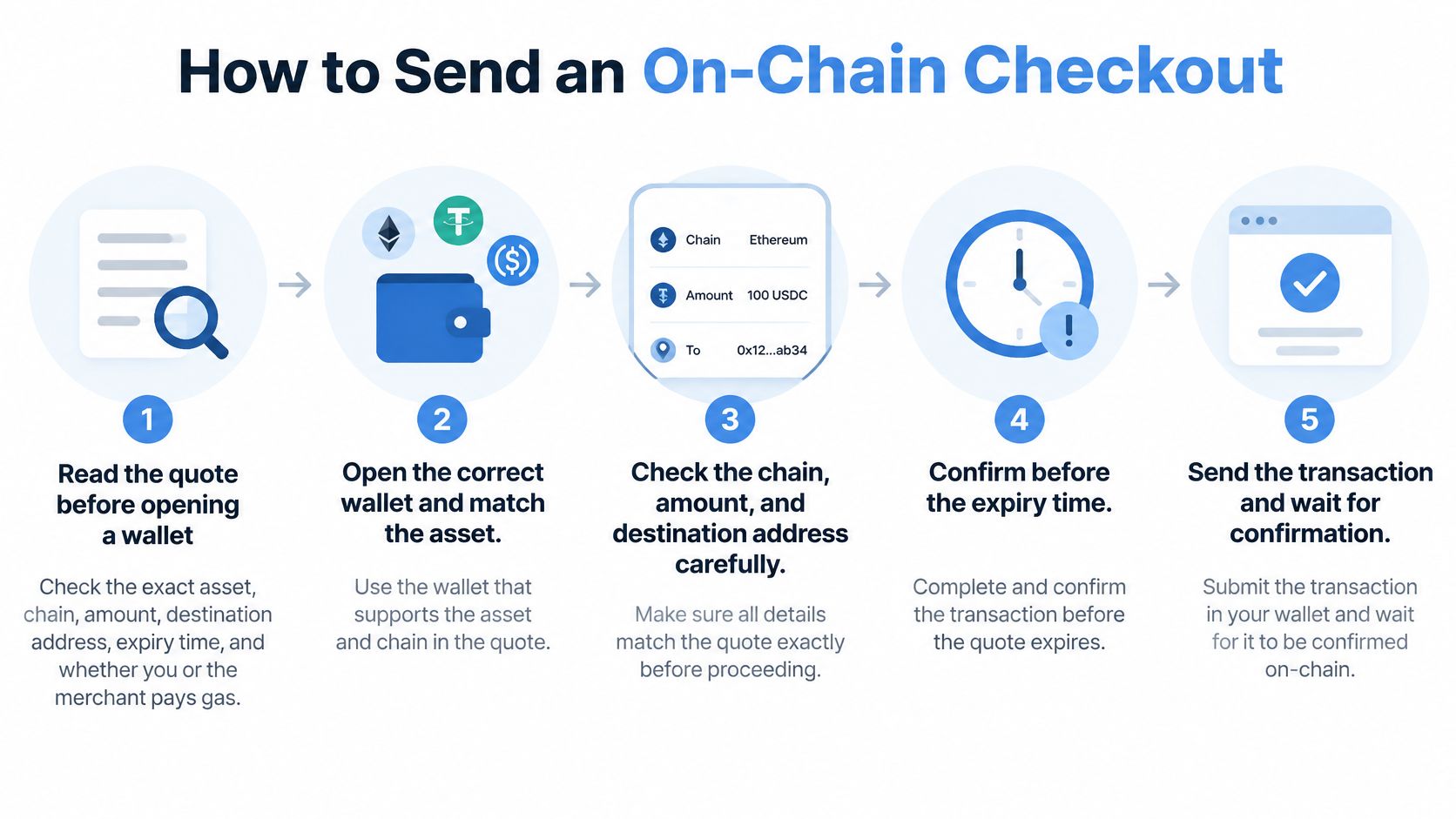
Match the Invoice Before Signing
Read the quote before opening the wallet. Find the exact asset, chain, amount, destination, expiry, and network-fee instructions. If the invoice says USDC but doesn't identify the network, stop and get a complete invoice. A token ticker alone doesn't identify a usable payment route.
Select the supported wallet network. Match the chain named on the invoice, not whichever network currently displays your balance. The same-looking address can exist across compatible networks without the processor monitoring all of them. Don't bridge or substitute assets unless the checkout explicitly supports that route.
Copy the destination from the current invoice and enter the exact amount. Compare the address displayed in the wallet with the invoice before signing. Keep enough of the chain's native fee token when gas is charged separately. Sending your entire token balance can leave you unable to pay the transaction fee.
Submit within the quote window, then follow the confirmation requirement. Check the wallet's status and the transaction in a block explorer if the checkout remains pending. Don't send again just because the merchant page hasn't updated. A broadcast transaction and a recognized order payment are separate events.
Save the transaction ID and match it to the order. Keep the invoice reference alongside it. If support asks for evidence, send the transaction ID, network, asset, amount, and order reference, not just a screenshot showing that your wallet balance fell.
Resolve Exceptions Without Sending More
Say you submit a payment close to expiry and the invoice later changes to expired. Don't top up the old address or start a replacement payment while the original remains unresolved. Give the processor the transaction ID and ask whether it will credit, refund, or reconcile the transfer.
If you haven't sent anything, request a fresh quote. If you have, establish what happened to that payment before authorizing another.
Merchants need the same discipline behind the interface. When evaluating checkout within a unified commerce platform from PlatformDTC, assess how payment status connects to the order record, fulfillment, and support workflow. A checkout integration still needs an explicit method for matching blockchain receipts to orders.
A successful wallet broadcast isn't your finish line. The order must show that the merchant recognized the payment.
Avoid attaching a test transfer to an expiring retail invoice unless the processor supports partial payments. A test can consume time, produce an underpayment, or leave the remaining amount attached to a quote that no longer applies.
For recurring invoices, create each payment from the new invoice rather than reusing an old destination. The merchant may issue a different address or reference to reconcile the next order.
How to Pay a Normal Shop With a Crypto Card
You're at a supermarket terminal that accepts cards and contactless wallets. The cashier doesn't need a blockchain address, and asking which network supports your USDT won't help. Your crypto card must handle that connection outside the merchant's checkout.
At the terminal, the action looks like an ordinary card purchase.
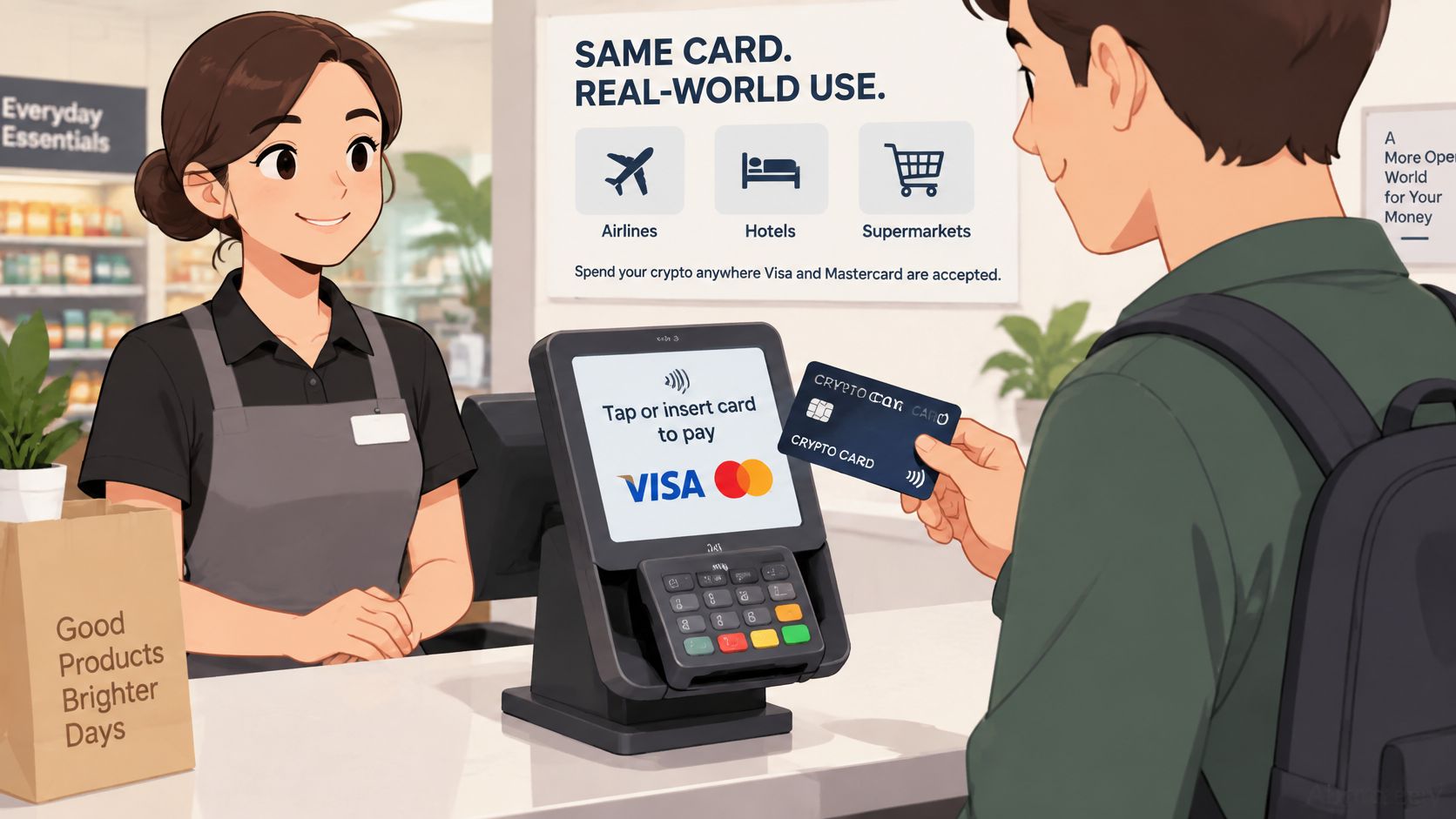
Set Up the Spendable Balance
Confirm eligibility and network acceptance. Check that the program issues cards to residents of your country and supports your intended purchases. Distinguish full identity verification, email-only registration, and advertised no-KYC access. Registration alone doesn't establish that every spending feature is available.
Fund the balance the card spends. A deposit asset isn't always a spending asset. The app may require conversion or movement into a separate card balance before authorization. Check whether you're depositing with an issuer or authorizing access to a wallet you control.
Choose the supported payment form. Add the virtual card to Apple Pay or Google Pay only if the issuer supports that combination. Some purchases require physical plastic, while some online merchants accept virtual card details directly. Don't assume a virtual card can satisfy an in-person deposit requirement.
Pay through the terminal or card form. Check that the card is active and funded with an available balance rather than a pending deposit. Hotels and similar merchants may request an authorization hold, so leave room beyond the displayed purchase amount.
Compare the app entry with the receipt. Find the crypto debited, conversion rate, transaction currency, any FX markup, and the final settled amount. Treat cashback as a separate credit until it's posted and available.
Sambapay's card payment settlement and security explained is useful context for distinguishing a terminal authorization from the later movement of funds. That distinction helps explain why an app can show a pending purchase before the final amount appears.
For a visual companion to the card-payment route, use the video below.
Acceptance Isn't Native Crypto Adoption
The Bank for International Settlements estimated that Visa- and Mastercard-linked stablecoin card initiatives processed about $4.5 billion in 2025. That measures a card-linked spending channel, not merchants deciding to hold stablecoins.
The card buys access to existing acceptance infrastructure. Your supermarket can receive fiat without managing private keys, choosing a blockchain, or opening an exchange account.
Keep authorization behavior in mind when choosing the funding asset. If the card sells a volatile coin when purchases occur, the amount of crypto consumed can change between purchases even when their fiat prices match. A stable balance makes spending easier to budget, but it doesn't make the issuer's conversion terms irrelevant.
Fees Spreads and Failed Quotes
Price the full conversion route, not just gas. A cheap blockchain transfer can still lead to an expensive purchase when the provider's exchange rate, card markup, and withdrawal charges are included.
Tazapay's stablecoin payments guide puts total on-ramp and off-ramp costs at roughly 0.5%–2.5%, depending on liquidity, provider, currency pair, and transaction size. That's a conversion benchmark, not a universal fee for every crypto checkout.
What a Crypto Payment Really Costs
| Cost layer | Practical range or pricing rule | When it hits | Who usually pays |
|---|---|---|---|
| On-ramp or off-ramp | Provider's quoted conversion charge and exchange rate | Moving between fiat and crypto | Customer or merchant, according to the quote |
| Card spread and FX | Issuer's disclosed spread, currency markup, and applicable fees | Conversion for a card purchase | Cardholder |
| Quote slippage | Rate-risk allocation specified by the quote | A quote expires or its rate guarantee no longer applies | The party assigned that risk |
| Network gas | Wallet's current fee estimate for the selected chain | An on-chain transaction is submitted | Sender, unless sponsored |
| Retry after a failed send | Another network charge if a replacement transaction is needed | An unresolved payment requires a new transfer | Usually the sender; check reimbursement terms |
Compare the Largest Lines First
Start with conversion. Ask how much fiat you must spend to acquire the required crypto, then how much the recipient gets after its own conversion. A provider can advertise a low service fee while using a less favorable exchange rate.
Next inspect the card's spread and FX rules. A card described as having no purchase fee may still charge for selling your asset or converting the transaction currency. Choose the merchant's local currency when appropriate rather than automatically accepting a terminal's offered currency conversion, and compare the actual terms.
If your route includes selling through AmaJova, review the selling fees before committing funds. Use the same habit for every conversion provider: inspect the final proceeds, not merely the fee label.
For card comparisons, the crypto card hidden-fee guide provides a useful checklist of charges to locate in the issuer's schedule. Keep funding, spending, currency conversion, and cash withdrawal costs separate so you don't mistake one free feature for a free payment route.
Budget for Exceptions
Quote expiry isn't permission to improvise the amount. A processor may need to reprice the invoice, return an unmatched transfer, or reconcile an underpayment manually. Each exception can leave the purchase unfinished even when the blockchain transfer succeeded.
Stablecoins reduce exposure to ordinary market-price swings compared with Bitcoin, but they retain issuer, depeg, screening, and redemption risks. A token's target price doesn't guarantee that every provider will redeem or convert it on the terms you expect.
Cost check: Compare what leaves your funding source with what reaches the recipient, then include the work needed to finish a failed payment.
For a merchant, compare that total with acquiring fees, treasury conversion, compliance checks, and support costs under its existing payment method. Don't compare only blockchain gas with an entire card-processing bill.
The useful operational measure is completed orders after quotes are issued, grouped by chain, wallet type, country, and payment amount. A lower advertised fee doesn't compensate for customers abandoning expired invoices or support staff repeatedly repairing unmatched payments.
Refunds Privacy and What Can Go Wrong
A blockchain payment is generally irreversible. Authorize the wrong transfer and the network will not cancel it the way a card issuer can reverse a disputed purchase. Recovery depends on whoever controls the destination address. Card payments work differently: the merchant often settles in fiat, so a refund may come back as a card credit rather than a coin transfer.
Before sending, confirm the invoice through the merchant's checkout or authenticated account. If a message announces a replacement address, stop and check through a separate support channel. Treat that message as a prompt to verify, not as authority.
Protect the Payment and the Evidence
- Check destination changes independently. Contact the merchant through its established support channel if instructions change. Do not trust the same message that supplied the new address.
- Use tests only where they fit. A small test transfer can make sense for a large agreed wallet payment to a new recipient. For an automated invoice, first establish whether the processor accepts partial payments.
- Save a usable evidence trail. Keep the invoice, quote timestamp, transaction ID, network, confirmation status, and any fulfillment or refund messages.
- Never share wallet recovery credentials. Support may need transaction details. It never needs your seed phrase or private key.
Settlement does not eliminate fraud. Crypto transactions can carry higher fraud risk, so screen wallets and devices before a merchant fulfills an order. A merchant should verify the asset and network, apply its confirmation policy, and hold suspicious orders for review. Buyers should expect an authenticated refund process, not a request to send more money to release the original payment.
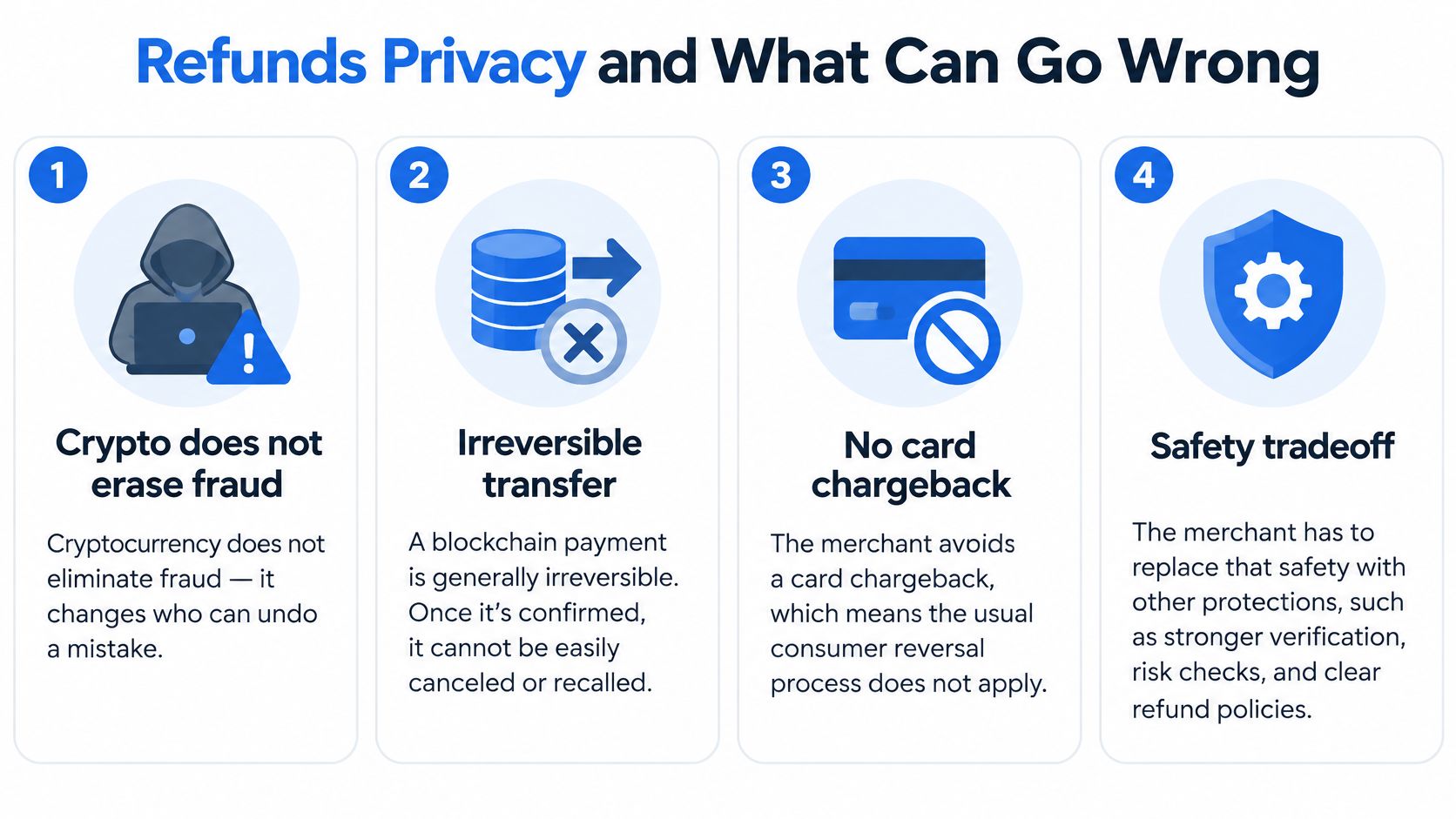
Agree on the Refund Destination and Amount
An on-chain refund is a new transfer. Ask whether the merchant refunds the original token quantity or the fiat value, who pays the network fee, and which exchange rate applies. A card refund may be simpler on the surface, but the issuer still applies its own timing and currency rules.
Provide a destination you control through the merchant's authenticated process. Do not request a return to an exchange deposit address without checking that the address can receive the token and credit your account correctly.
Crypto-card problems follow a different support route. If authorization fails, use the issuer's reason code and the checks in crypto card declined reasons and fixes rather than retrying the same charge or sending a separate wallet payment to the merchant.
Separate Ledger Visibility From Identity Checks
A public address is not the same as anonymity. Once someone links it to you, they may inspect related transfers and balances on that chain. A crypto card usually keeps wallet details away from the cashier, but the issuer can hold identity and spending records. A no-KYC label does not establish anonymity, solvency, or protection if access to funds is suspended.
Crypto and the cards that use it carry risk, including loss of funds. Choose the custody and privacy exposure you can tolerate, not just the lightest signup process.
Check Card Terms Before You Load One
A card can look suitable in a comparison and still be wrong for your country, spending pattern, or preferred wallet. Use the application stage to eliminate those mismatches before transferring a meaningful balance.
A Pre-Application Checklist
Filter for eligibility first. Confirm the card network, supported residency, and verification tier. Make sure issuance is available where you live, not merely that the website allows you to begin registration.
Read the cost and limit schedule together. Locate purchase fees, load fees, FX markup, and transaction and monthly spending limits. Check whether a limit changes after verification or applies separately to cash withdrawals.
Confirm the exact spending assets. Establish whether BTC, ETH, USDT, or USDC can fund purchases directly, requires conversion, or is accepted only as a deposit. Check supported deposit networks separately from token names.
Identify who controls the balance. Determine whether the issuer holds your assets or the card uses wallet permissions or an on-chain spending contract. For wallet-connected cards, inspect allowances and how to revoke access.
Check reporting and rewards conditions. The app should let you reconcile the asset sold, conversion rate, markup, and local-currency charge. Read reward exclusions, redemption restrictions, and any holding requirements before treating cashback as savings.
Verify current terms before funding. Card terms can differ by country and tier, so confirm details on the provider's own site before applying. Keep the initial balance small until a merchant authorization settles and you've matched the receipt to the app.
Keep Enough Records to Reconcile
Save the fee schedule and relevant terms you relied on, together with the application confirmation. If the issuer later changes a charge or limit, you'll have a clear record of what you checked.
Don't preload a travel budget just because the virtual card was issued successfully. Confirm that the card works for the kind of purchase you need, that settlement reporting is understandable, and that you can recover or withdraw an unused balance under the published terms.
NomadCards is an independent comparison site for crypto debit and credit cards, with filters for fees, KYC requirements, supported coins, networks, and custody features. Visit NomadCards to shortlist cards that fit your checkout needs, then verify the issuer's current terms before loading funds.